What is it?#
Cinemate is a boilerplate cinema camera system for Raspberry Pi 5 building on CinePi‑RAW recorder by Csaba Nagy for enabling 12 bit (or even 16 bit) Cinema DNG recordings using off-the-shelf components.
Cinemate provides a minimal starting point that you can extend with your own controls and accessories.
The project combines a Python UI with a custom fork of cinepi-raw.
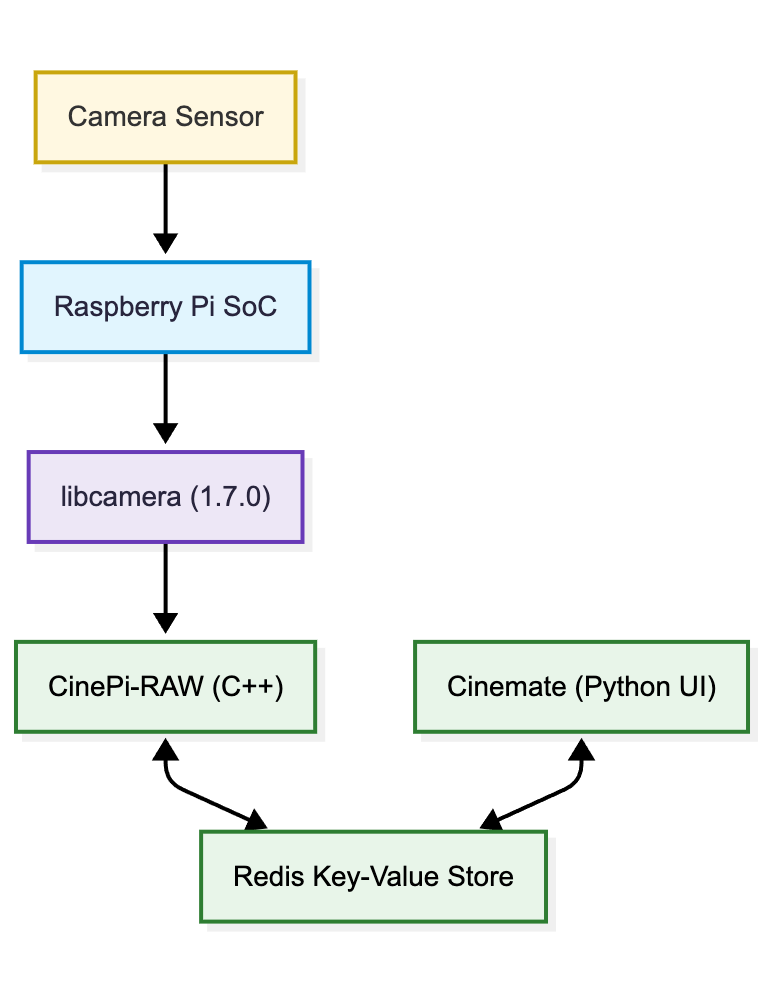
Figure 1: Camera stack exploded view. Apps change settings by updating Redis keys. CinePi-RAW listens for those updates and captures frames accordingly while Cinemate provides the camera user interface.
New features in version 3.2#
-
improved mounting mechanics for NVME and SSD drives with less drop frames
-
storage preroll to "warm up" the recording media, improving writing stability
-
improved audio sync with correction of effective fps (different resolutions/frame rates due to sensor VBLANK), available for fine tuning in
src/module/sensor_correction_factors.py -
option to record a fixed number of frames or seconds for user calibration of fps correction factors (run Cinemate manually for this calibration as feedback is supplied in the terminal)
-
system startup fix to have Cinemate wait for sensor to be loaded properly by the system (contribution from user Yabbo01)
-
simple GUI now supports different resolutions defined by the user in
setting.json(contribution from user 0point)
Installation#
See the releases section for preinstalled image file and Quick Start Guide.
For manual install of the camera stack on Raspberry Pi Bookworm, see the here.
Compatible sensors#
- IMX477 (official Raspberry Pi HQ camera)
- IMX296 (official Raspberry Pi GS camera)
- IMX283 (OneInchEye by Will Whang)
- IMX585 (Starlight Eye by Will Whang)
Preinstalled hardware#
Customization#
Buttons, encoders and oled display are optional and configured via the settings file.
Join the CinePi Discord for discussions and sharing builds.
Supporting the project#
