Playback#
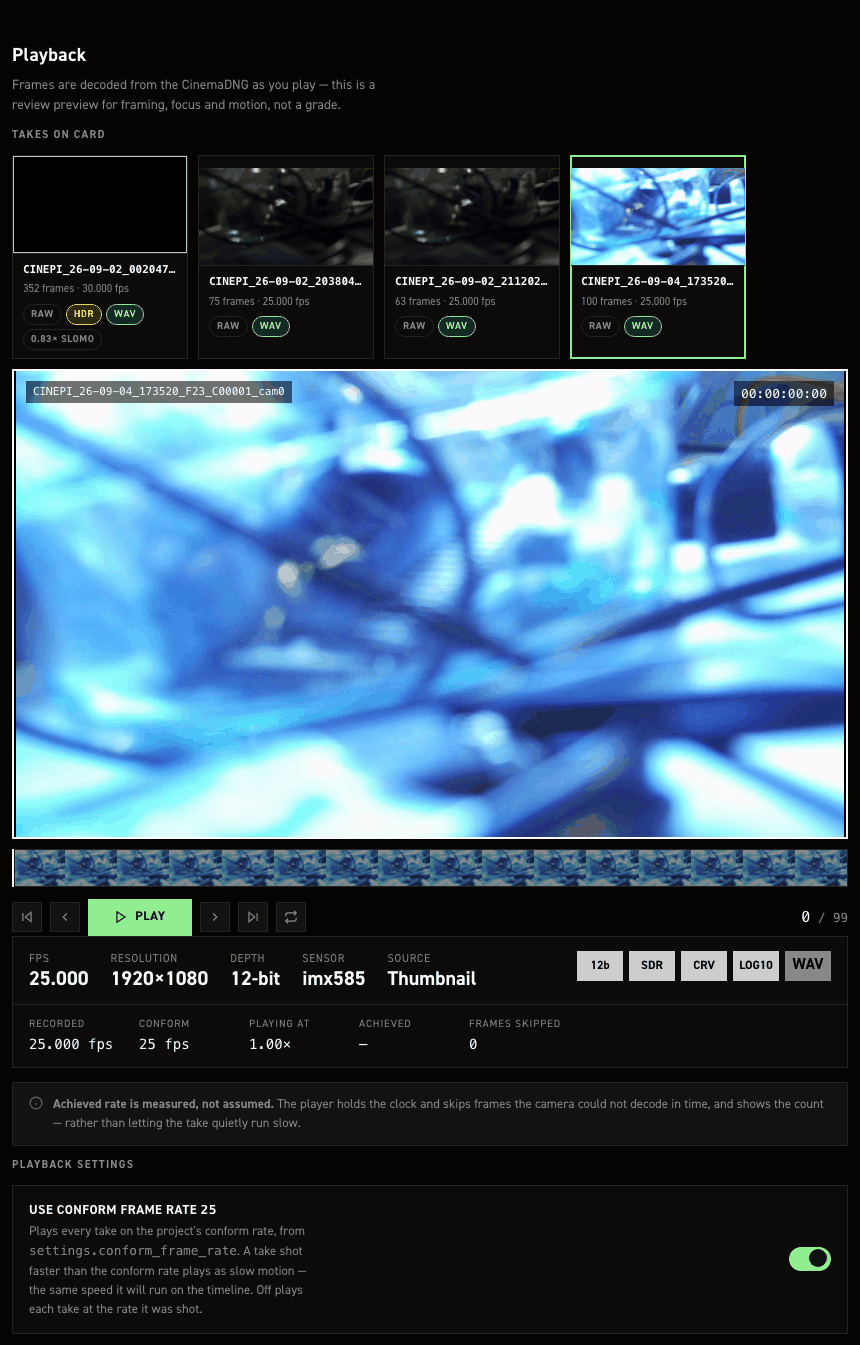
Play a recorded take back in the browser, without taking the card out. Frames are decoded from the CinemaDNG files on the card as you play — nothing is transcoded, and nothing is written back to the take.
Playback runs at the conform frame rate, so a take shot faster than the conform rate plays as slow motion, at the speed it will run on the timeline.
Reaching it#
The pane is a tab in the settings editor:
http://cinepi.local:5000/settings-editor/
Choose Playback · review takes. Over the camera's own hotspot the settings editor is at http://10.42.0.1:5000/settings-editor/ (see Configuring the Wi-Fi hotspot).
Choosing a take#
The take strip heads the pane, listing every take across mounted storage with a thumbnail from its first frame. Picking one loads it into the player below and scrolls you down to it. Each card shows the take name, its frame count and its recorded frame rate, plus badges:
| Badge | Meaning |
|---|---|
RAW, RAW1, RAW2 |
Which mounted drive the take is on — RAW is the active one |
HDR |
The take holds HDR-range data (see Take metadata) |
WAV |
The take has an audio sidecar |
0.50× SLOMO, 2.00× FAST |
The take's playback speed against the conform rate. Absent when the take plays at 1.00× |
Sort orders the strip: oldest first (the default — shooting order, so the first take is leftmost and each later one to its right), newest first, or largest first. The same three orders are offered on the RAW files pane.
View picks the shape: one row, which scrolls sideways and keeps the player in sight on a card with a lot of takes, or grid, which wraps every take onto the screen at once for picking one out visually.
Neither disturbs what is on the player. The selected take keeps playing and simply moves.
The embedded thumbnail#
Both the take-strip preview cards and the player itself decode this embedded thumbnail rather than the raw frame — raw decode is far more demanding on the Pi. The pane plays whatever the take actually carries — greyscale, colour, or colour JPEG — with no field of its own to override it. It plays in colour, at 640×360, by default: image_capture.thumbnail defaults to jpeg and image_capture.thumbnail_size to 1 (half the lores plane), roughly 10–25 KB per frame — the same picture uncompressed colour would give at 691,200 B. The settings editor shows this as a single on/off toggle; set thumbnail mono (or the key set to mono in the file) switches to an uncompressed greyscale thumbnail, and colour to an uncompressed colour one, for anyone who would rather not have a JPEG encode in the frame path. image_capture.thumbnail_size trades resolution for size independently of mode — 0 is the full lores plane, 2 a quarter. Changing thumbnail_size restarts the camera; changing thumbnail takes effect on the next take, with no restart. See settings.jsonc's "DNG thumbnails" section for the full cost table.
A JPEG take (thumbnail = jpeg) is served to the browser without re-encoding: IFD1's strip already is a baseline JPEG, so the pane reads it and serves it as-is, unlike the two uncompressed modes, which are still decoded and re-encoded through PIL on every request the way they always were.
A take recorded with thumbnail set to off (0) — or one from before a rebuilt cinepi-raw shipped the embedded thumbnail at all — carries no thumbnail and is not currently playable in this pane.
Playing#
Transport controls sit under the picture: first frame, previous frame, PLAY, next frame, last frame, and a loop toggle. Drag anywhere on the filmstrip to scrub — it holds sixteen frames sampled evenly across the take, with the playhead marking the current position. The take's name and the elapsed position show over the top of the picture.
Playing again from the last frame restarts from the beginning unless loop is on.
Playback speed and the conform frame rate#
Playback is paced by settings.conform_frame_rate (see Settings file), not by the rate the take was shot at. That is the point: what you see is what the take will do once it is conformed in post.
- A take shot above the conform rate plays as slow motion. 50 fps on a 25 fps conform plays at 0.50×.
- A take shot below it plays fast.
- A take shot at it plays at 1.00×.
Turn Use conform frame rate off to play each take at the rate it was shot instead.
Speed ramps replay correctly with no extra setting. Every DNG carries its own frame rate, and in conform mode playback simply steps one frame per conform tick — so a take whose frame rate changed mid-shot plays back with the ramp intact.
Take metadata#
Everything in this row is read from the take's own DNG files, not from what the camera is set to now — so an old take reads correctly even if the camera has been reconfigured since.
FPS, Resolution, Depth and Sensor come straight from the frame's tags. Depth is the take's original/source depth, not necessarily the literal BitsPerSample stored in the file — a log-encoded take compresses to 10-bit for storage, and showing that number instead of what the take was actually shot at (12-bit SDR or 16-bit ClearHDR) was more confusing than useful. Look for LOG10 if you want to know whether that compression happened. The grey boxes to the right are:
| Box | Meaning |
|---|---|
12b, 16b |
Bits per sample the take was shot at |
SDR |
Standard-range capture |
HDR |
The take holds more range than a 12-bit sensor mode can carry — ClearHDR, in either its 16-bit linear or 12-bit companded form |
LIN |
The samples are linear |
CRV |
A curve is baked into the file and a reader must apply it before the levels mean anything |
LOG10 |
The take was log-encoded and stored as 10-bit — Depth already shows the original depth it was shot at, this just says the compression happened |
WAV |
The take has audio; — means it does not |
CNF |
The take is playing at something other than 1.00× because of the conform rate |
DROP N |
The recording is missing N frames — a gap in cinepi-raw's own frame-numbering, read from the filenames on disk. Nothing to do with this playback session's own speed; no badge means either zero drops or the frame numbering couldn't be read, not necessarily a clean take |
| Playback stops on its own | The browser tab was moved to the background. Browsers throttle background tabs to about one tick a second, so playback stops rather than reporting a skip count that means nothing |
| Picture greys out mid-playback | A recording started |
| A take listed with no metadata | Its first frame could not be read — the take is still listed rather than hidden |