Overview#
CineMate is an open-source boilerplate for building your own digital cinema camera on a Raspberry Pi 4 or 5. It records CinemaDNG raw files (10/12-bit, plus 16-bit ClearHDR on the IMX585) using off-the-shelf parts.
It pairs a lightweight Python interface with a custom fork of cinepi-raw, built on the CinePi-RAW recorder by Csaba Nagy.
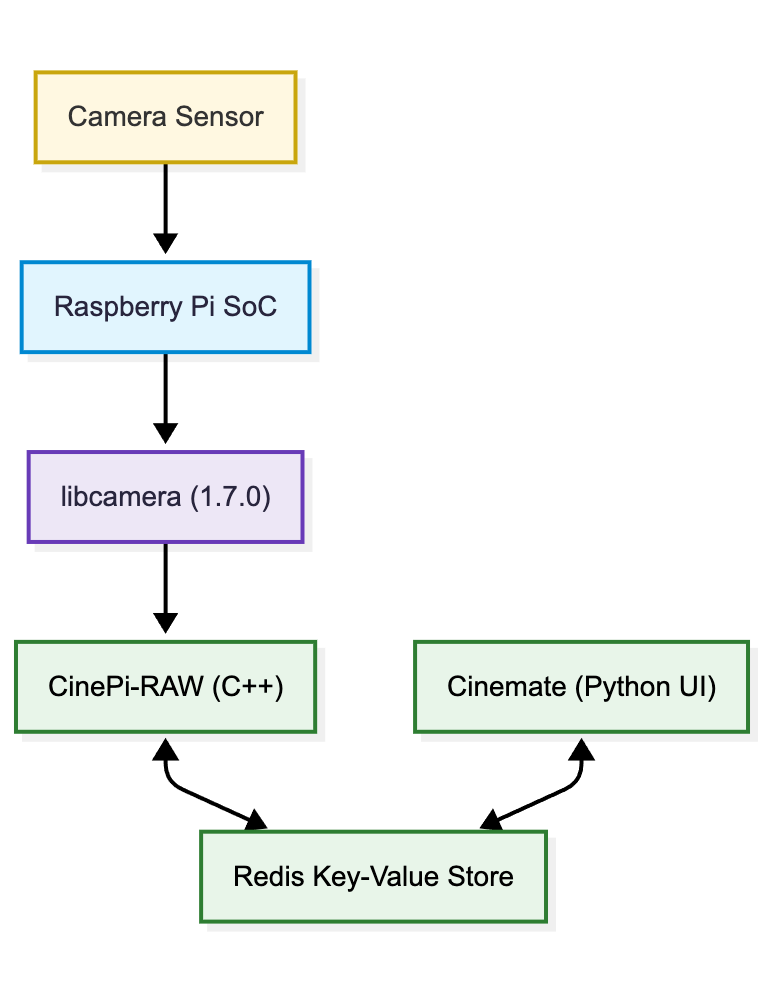
Figure 1: The CineMate camera stack — CineMate (the user interface) running on top of CinePi-RAW (the recorder).
Installation#
Easiest path is to flash the prebuilt image — see the Quick start and the releases page.
To build the stack yourself on Raspberry Pi OS Lite (Bookworm), or to use the one-click installer, see Manual installation.
Installing for a non-default sensor
The installer sets up IMX477 on cam0 by default, but it installs the IMX283 and IMX585
drivers regardless of which sensor you name. So for most sensors you can install with the
defaults and then pick your sensor in the browser, on the settings editor's
config.txt tab — no reinstall needed.
You can still name the sensor up front, which also writes the matching config.txt overlay:
SENSOR_MODEL=imx296 CAM_PORT=cam0 ./cinemate-install.sh
SENSOR_MODEL=imx283 CAM_PORT=cam0 ./cinemate-install.sh
SENSOR_MODEL=imx585 CAM_PORT=cam0 ./cinemate-install.sh
SENSOR_MODEL=imx585_mono CAM_PORT=cam1 ./cinemate-install.sh
Two cases where naming it up front still matters: imx585_mono also applies the
rp1-cfe kernel patch that mono 16-bit ClearHDR needs, and imx585 also installs the
IR filter helper. Neither can be done from the browser later — rerun the installer, or run
scripts/patch-rp1-cfe.sh by hand.
Customisation#
GPIO buttons and switches, rotary encoders, potentiometers and the OLED display are optional — see Additional hardware for an overview. They are configured via the settings file. On the Pi, type editsettings in the terminal to open it.
Compatible sensors#
- IMX477 (official Raspberry Pi HQ camera)
- IMX296 (official Raspberry Pi GS camera)
- IMX283 (OneInchEye by Will Whang)
- IMX585 (Starlight Eye by Will Whang)
Preinstalled hardware#
What's new#
See the changelog for the latest release notes.
Community#
Join the CinePi Discord to discuss and share builds.
Supporting the project#
